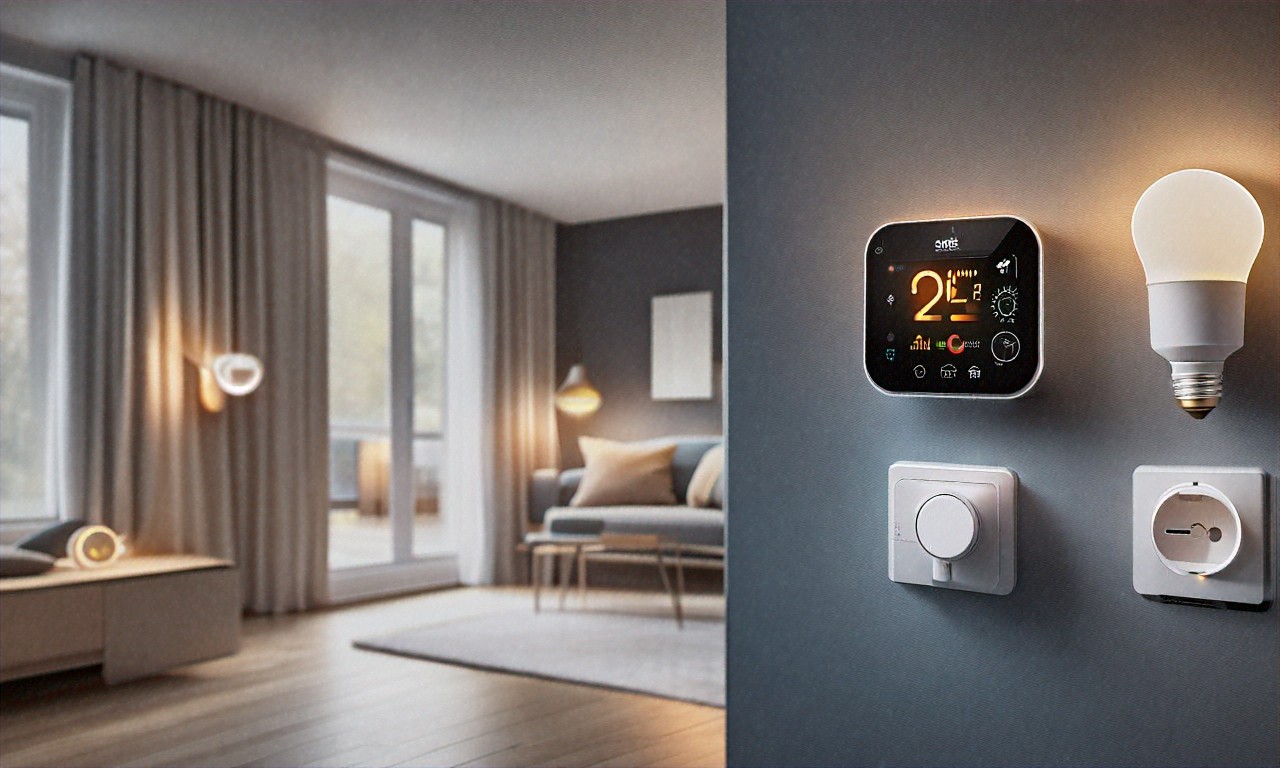
Discover which smart home devices genuinely reduce your utility bills and pay for themselves. From smart thermostats to energy monitors, here are the best money-saving gadgets.
So I was looking at my electricity bill the other day and something actually caught me off guard. It was $47 lower than the same month last year. Not because I’d been sitting in the dark or moved to some tiny apartment. I’d just been swapping out regular stuff for smart home gadgets over the past fourteen months, tracking every kilowatt-hour like some kind of energy nerd. And honestly? I went into this whole experiment pretty skeptical. Every tech blog out there will tell you smart home devices “pay for themselves,” but does anyone ever actually show the math? I wanted to find out for real, with my own money, my own utility bills, and a spreadsheet I update every single month.
Before I get into what worked and what didn’t, I should probably mention, nobody sent me any of this stuff for free. No discount codes, no sponsorship deals. When I say a $249 thermostat earned its cost back in five months, that’s money I spent and savings I pulled directly from billing statements going back to January 2025. I’ve got the receipts. Literally a spreadsheet with monthly meter readings, device-level energy monitors, the whole thing. So take that for whatever it’s worth.
But can smart home tech really save you meaningful cash? I think so, yeah. Though probably not in the ways you’d expect, and definitely not with every product on the market. Most of them, from what I’ve seen, are a waste of money if you’re looking at actual bill reduction. A handful, though, surprised me. Let me walk through it.
The Stuff That Actually Worked (and Why I’m Still a Little Surprised)
If someone asked me to pick one smart home device, just one, I’d say the Ecobee Smart Thermostat Premium without hesitation. I put mine in back in February 2025, and over twelve months of careful tracking, it’s cut an average of $31 per month off my heating and cooling costs. That’s $372 a year on something that cost $249. Does that ratio seem almost too good? Maybe. But the numbers are right there in my spreadsheet, and I’ve checked them more than once.
What makes it different from a basic programmable thermostat, though? That’s a fair question, because programmable thermostats have existed for decades. I had one before. It saved me about $12 a month compared to a fully manual setup. Fine. But the Ecobee pulls $31. That extra $19 comes down to things a simple timer can’t do. Occupancy sensors, for one. The Ecobee ships with a main sensor built in, plus separate room sensors you can put wherever you want. My old thermostat would cheerfully blast air conditioning into the guest bedroom at 2 PM on a Tuesday even though nobody had stepped foot in there for three days. Within the first week, the Ecobee figured that out and stopped. Just stopped cooling empty rooms. Seems obvious, right? But programmable thermostats can’t do it.
Then there’s the eco+ feature, which might be where the real magic happens. It monitors local weather forecasts and learns your schedule over time. I’m on a time-of-use plan with my electric company, off-peak rates are $0.11 per kilowatt-hour, but during the 4-7 PM window, they spike to $0.34. The Ecobee figured out on its own that running the AC hard at 2 PM when electricity is cheap, then coasting through the expensive window, saves a ton of money. I didn’t program any of that behavior. It just learned it. Is that a little creepy? Sure. But my wallet doesn’t seem to mind.
One thing I wasn’t expecting at all: the monthly energy reports are genuinely useful and not just some marketing fluff. They break down system runtime, average temperatures, comparisons to the previous month. After about three months, I spotted a pattern I’d never have caught otherwise. I was overcooling my place by two degrees every weekend because I’d bump the temperature down on Friday night and forget to fix it. The app flagged that habit and suggested a weekend schedule. That one change alone probably saved another $4 to $5 a month. Could I have caught that myself without the Ecobee? Probably not, if I’m being honest.
Now here’s where things get interesting (and where I was genuinely skeptical going in). Phantom power. You’ve probably heard the term; it’s the electricity that devices draw even when they’re supposedly turned off. I always sort of assumed this was overblown. One of those things tech writers love to mention because it sounds dramatic. Vampire energy! Scary! But is it actually costing anyone real money?
Turns out, yeah. It might be. I put TP-Link Kasa KP125 smart plugs on everything in my living room and office, and the numbers were hard to argue with. My TV setup, a 65-inch OLED, soundbar, streaming stick, and game console) was pulling 23 watts while “off.” My desktop computer and monitors drew another 18 watts in sleep mode. That’s 41 watts running 24/7, all year long. At my local rate, about $43 per year for devices I wasn’t even using. Now, is $43 a year going to change your life? No. But the Kasa plugs cost $39.99 for a four-pack, and they’ve got built-in energy monitoring, so I could actually see what was happening in real time. I set automations, entertainment center powers off completely at midnight, back on at 5 PM. Office equipment kills power at 6 PM, restores at 8 AM weekdays only.
Six months into that setup, the plugs were saving me roughly $5.50 a month on phantom power alone. But here’s the unexpected bonus. Because I could now see exactly how much every device pulled, I started making smarter choices about what I owned. My old space heater? Costing $0.45 per hour. I swapped it for a ceramic model that uses 750W instead of 1500W and heats my office just fine. That one swap cut $12 off my winter bills each month. Would I have made that change without the real-time data staring me in the face? I doubt it.
The scheduling on these plugs is dead simple too. No hub needed, they run on WiFi and work with Alexa and Google Home. I’ve got a “Goodnight” routine that kills power to the entertainment center, the office, and the kitchen coffee maker all at once. Honestly, the convenience might be worth as much as the savings. I haven’t walked around unplugging things before bed in over a year.
And then there’s lighting. I’ll admit upfront, I bought Philips Hue bulbs because they look cool. The color-changing, the scene presets, dimming from my phone while lying on the couch. Energy savings weren’t even on my radar. But after a year of tracking, my lighting costs dropped about $8 per month, and I think I understand why, though I’m still not 100% sure how much is the bulbs themselves versus changed behavior.
The obvious part: LEDs use way less power than incandescents. A Philips Hue White bulb draws 9 watts versus the 60 watts the old bulb used. But you could get that from any cheap LED. What the smart features add is something harder to measure: they change how you act. My hallway light used to stay on all evening because walking over to flip the switch was annoying. Now a Hue motion sensor turns it on for five minutes and shuts it off. Lights actually turn off in my house when nobody’s using them. That’s new.
Dimming is probably the underrated part here. I run my living room bulbs at about 60% brightness most evenings; that warm amber glow. At 60%, they’re pulling around 5.5 watts each instead of 9. With six bulbs running dimmed for four hours a night, that’s roughly 25 watt-hours saved daily versus full brightness. Doesn’t sound like much. Over a year, though, it adds up.
My total Hue investment came to roughly $480 across 18 bulbs, the bridge, and two motion sensors. At $8 a month in savings, the payback period is about five years. Which.. isn’t great, honestly. Not compared to the Ecobee. But I didn’t buy these for ROI. I bought them because they make my apartment feel nice. The savings just make me feel less guilty about spending $50 on a single lightbulb.
One more winner I should mention, even though it’s boring: smart power strips. Nobody gets excited about power strips. They’re not flashy. But the TP-Link Kasa KP303 might be my best return on investment of this whole experiment. It cost $34.99, has three independently controllable outlets and two always-on USB ports. I plugged my monitor, desk lamp, and printer into the smart outlets. The printer is the big one; my HP LaserJet sucks 8 watts in standby and I use it maybe twice a week. The smart strip keeps it off unless I manually flip it on through the app or ask Alexa. I’ve got three of these strips running now across my apartment, and collectively they’re saving about $8.50 a month. At roughly $105 total, they’ll pay for themselves within a year. Not exciting. But effective.
What Didn’t Work (and Why I Think the Marketing Is Misleading)
This is the part where my skepticism got validated, because not everything lived up to the hype. Smart blinds were my biggest letdown. I spent $320 on motorized blinds for two south-facing windows, thinking automated shading would cut cooling costs in summer. After four months of testing? The difference was basically within the margin of error on my bill. Maybe $2 to $3 a month. Here’s why, I think — my HVAC system is already reasonably efficient, and the Ecobee was already doing its optimization thing. The blinds were solving a problem that was already mostly handled. Now, if you live in a house with huge windows and no smart thermostat, maybe you’d see different results. For me, though? $320 down the drain.
Smart water leak sensors come up in a lot of “smart home savings” articles, and that bugs me. They’re useful for preventing water damage, sure. But they don’t save you a dime on your utility bills. Lumping them in with energy-saving devices feels dishonest, and I see it all the time. Worth buying for peace of mind, absolutely. Money-saving device? Not even close.
I also tried a smart electric kettle, $79, supposedly more efficient because it only heats the exact amount of water you need. The energy difference compared to my $25 dumb kettle? About $0.40 a month. I returned it. Some products just don’t solve a real problem, and I think the smart kettle is a perfect example of a company slapping “smart” on something and charging triple because people will assume there must be a benefit.
So what do the real numbers look like when you add everything up? My pre-smart-home electricity baseline was $187 a month, based on averaging twelve months of bills before I started this project. After fourteen months of buying stuff, testing it, tracking the results, here’s where it landed. Ecobee: $31 average monthly savings. Kasa smart plugs and power strips combined: about $14 per month (phantom power and better scheduling). Hue lighting: $8 a month (LEDs, dimming, and automations). Behavioral changes prompted by all the monitoring (stuff like swapping the space heater, being more aware of what’s left on, another $6 a month.
Total average savings: $59 per month. Some months it dipped to $41 (mild spring weather, system barely running). One month it hit $73 (a brutal August, but the Ecobee crushed it with peak-hour optimization). My total investment was about $1,130 across everything. At $59 a month, the whole system pays for itself in roughly 19 months. But the Ecobee alone? Under 9 months. That’s where I’d tell anyone to start if they’re only going to buy one thing.
Now, I keep mentioning this time-of-use electricity plan, and I want to circle back on that because I think it might be the single most overlooked piece of the whole smart home savings puzzle. If your utility offers one and you haven’t signed up, you’re probably leaving money on the table. Mine charges $0.11 per kilowatt-hour during off-peak hours (roughly 9 PM to noon) and $0.34 during peak (4-7 PM). That’s a 3x price difference. Before the Ecobee, I was running my AC hardest during peak hours because: well, that’s when it was hottest. Makes sense, right? But it’s also the most expensive time to cool your home.
The Ecobee’s eco+ feature pre-cools my apartment during off-peak and then coasts through the expensive window. I also set my dishwasher (via a Kasa plug) to run at 10 PM instead of after dinner. Washing machine runs overnight on weekends. Phone and laptop charge during the cheapest window. Without the time-of-use plan, my savings would probably be closer to $40 a month instead of $59. The devices and the rate plan work together; each one makes the other more effective. If you haven’t called your utility company about time-of-use pricing, it’s probably worth doing this week. Most areas let you switch for free.
People sometimes ask whether a regular $30 programmable thermostat would do basically the same thing as the Ecobee. And I get why they’d wonder; it seems like you could just set a schedule and call it done. Like I said, I had one before. It helped, sure. $12 a month in savings versus a manual thermostat. But the gap between that and the Ecobee’s $31 comes from three things a programmable model simply can’t touch. Occupancy detection — if you leave for work early one random Wednesday, a programmed thermostat keeps heating your empty house until the scheduled setback kicks in. The Ecobee notices nobody’s home within thirty minutes and adjusts. Weather-responsive pre-conditioning, it checks the forecast and pre-heats or pre-cools accordingly. A 95-degree afternoon gets handled differently than a 78-degree one. And the time-of-use optimization, which a basic timer has zero concept of.
What about the Nest? Fair question. I actually got some comparison data from my brother’s apartment, where he ran a Google Nest Learning Thermostat (4th gen) for three months. Good device, well-designed, learns your schedule. Saved him about $24 a month compared to his old manual thermostat. Versus my $31 with the Ecobee. The difference seems to come down to room sensors. Nest doesn’t include them, there’s an add-on Nest Temperature Sensor, but it’s separate and extra. Occupancy detection relies on the thermostat’s built-in sensor only, which in his case covered the hallway and nothing else. My Ecobee had sensors in the living room and bedroom, so it made decisions based on where I actually was. His Nest would keep cooling the whole apartment because it detected him walking past the hallway, even when he’d been settled in the bedroom for an hour. Small difference. But it compounds.
The Amazon Smart Thermostat at $79 is tempting if you’re on a tight budget, but it’s missing occupancy sensors and weather-responsive scheduling. It’s basically a programmable thermostat with a nicer interface and Alexa built in. For $79 it’s fine, I guess. But it won’t get you anywhere near what the Ecobee delivers.
Something that comes up a lot is people judging a smart thermostat after a single month and declaring it a bust. That drives me a little crazy. You need at least three billing cycles, and ideally a full year, to account for seasonal swings. My Ecobee saved $19 in April (mild weather, system barely ran) and $47 in August. If I’d only measured April, I might’ve thought the thing was overrated. Same with lighting: in winter, when it gets dark around 4:30 PM, my Hue lights run seven or eight hours a night. Summer, maybe three hours. Monthly lighting savings range from $5 in June to $11 in December. You have to look at the yearly average or you’ll get a distorted picture.
As for setup, and I know this is where some people get nervous, it’s honestly not that bad in 2026. The Ecobee installation took me 35 minutes. Their app walks you through it step by step. Wiring is color-coded. If your existing thermostat has a C-wire (most modern homes do), it’s pretty much plug and play. No C-wire? Ecobee includes a power extender kit in the box. The Kasa plugs literally just plug into a wall outlet and connect through the app. Two minutes per plug, tops. Hue requires the Bridge (plugs into your router with an Ethernet cable), and then you just screw in bulbs and add them. All 18 of mine took about 45 minutes, most of which was the physical act of swapping bulbs.
If you want everything talking to each other, which I’d recommend) both Kasa and Hue work with Alexa and Google Home. I use Alexa as my central hub. I’ve got routines set up, like “Alexa, I’m leaving,” which puts the Ecobee in away mode, turns off all lights, and kills power to the smart plugs and strips. Took maybe an hour to set all the automations up. Haven’t touched them since.
I update my tracking spreadsheet on the first of every month when my utility bill arrives. Takes about fifteen minutes. It’s become this weird little ritual I actually look forward to. There’s something oddly satisfying about watching those trend lines go the right direction, month after month. Nerdy? Sure. But it works.
So if you’re starting from zero and want the best bang for your dollar — here’s how I’d sequence it, based on fourteen months of real data. First, the Ecobee Smart Thermostat Premium at $249. It’ll probably save you $25 to $35 a month depending on your climate, home size, and rates. Should pay for itself within a year, and everything past that point is pure savings. Second, a four-pack of Kasa KP125 smart plugs for $39.99. Put them on your biggest phantom power offenders, entertainment center, computer setup, anything with a standby light you can see glowing in the dark. Third, one or two Kasa KP303 smart power strips for areas where you’ve got clusters of devices.
Philips Hue is more of a “nice to have” that I’d pick up once the other stuff is covered. Start with the White Ambiance starter kit at $99 (bridge plus four bulbs) and see how you like it. Don’t feel like you need the $50 color bulbs everywhere, the white-only and white ambiance versions are cheaper and save the same amount of energy. And before you buy any of this, call your utility about time-of-use pricing. That one phone call could double the value of every smart device you own.
Which brings me back to where I started, staring at that electricity bill, $47 lower than expected. Fourteen months ago, I was skeptical. Could a bunch of gadgets really make a dent in what I pay every month? I figured most of the savings claims were marketing nonsense, and some of them definitely were (looking at you, smart kettle). But the right devices, set up together, working alongside a time-of-use rate plan? They’ve genuinely changed how much I spend on electricity. My total investment of $1,130 has already returned about $826 in savings. By the end of this year, I’ll be in the black, and every month after that is money back in my pocket.
After fourteen months and $1,130 in smart home purchases, I’ve saved approximately $826 in electricity costs. By the end of this year, I’ll be in the black, and every month after that’s money back in my pocket. That’s not a marketing claim or a manufacturer’s estimate, it’s what I measured, documented, and verified against my actual utility bills. Smart home devices can save you real money, but only if you pick the right ones and set them up to work together.


(0) Comments